I spent a Saturday afternoon setting up twenty scheduled tasks in Claude Desktop. Before today, I had three bash scripts running on macOS LaunchAgents — email triage, a news scanner, and an automation for a side project. By the end of the session, I’d replaced all three and added seventeen more.
I don’t know yet if this will work as well as I think it will. But the design decisions were interesting enough to write about before the results come in.
Bash scripts hit a ceiling
Claude Desktop — Anthropic’s desktop app — added scheduled tasks recently. You write a prompt, pick a time, and the app runs it unattended. No cron jobs, no plist files, no launchctl load. Just a prompt and a schedule.
My existing setup was bash scripts triggered by LaunchAgents. They worked, but they could only do what bash can do. A bash script can’t reason about whether an email needs a reply or is just a notification. It can’t decide which AI news stories are worth writing about. It can’t look at my calendar and adjust a briefing based on what’s already happened that morning.
A scheduled Claude session can do all of that because it’s a full model session with access to the same tools I use interactively — file system, APIs, shell commands, web search. The difference is I’m not there when it runs.
A train schedule for the machine
I organized them into tiers based on how often they run and what they touch.
Daily (eight tasks):
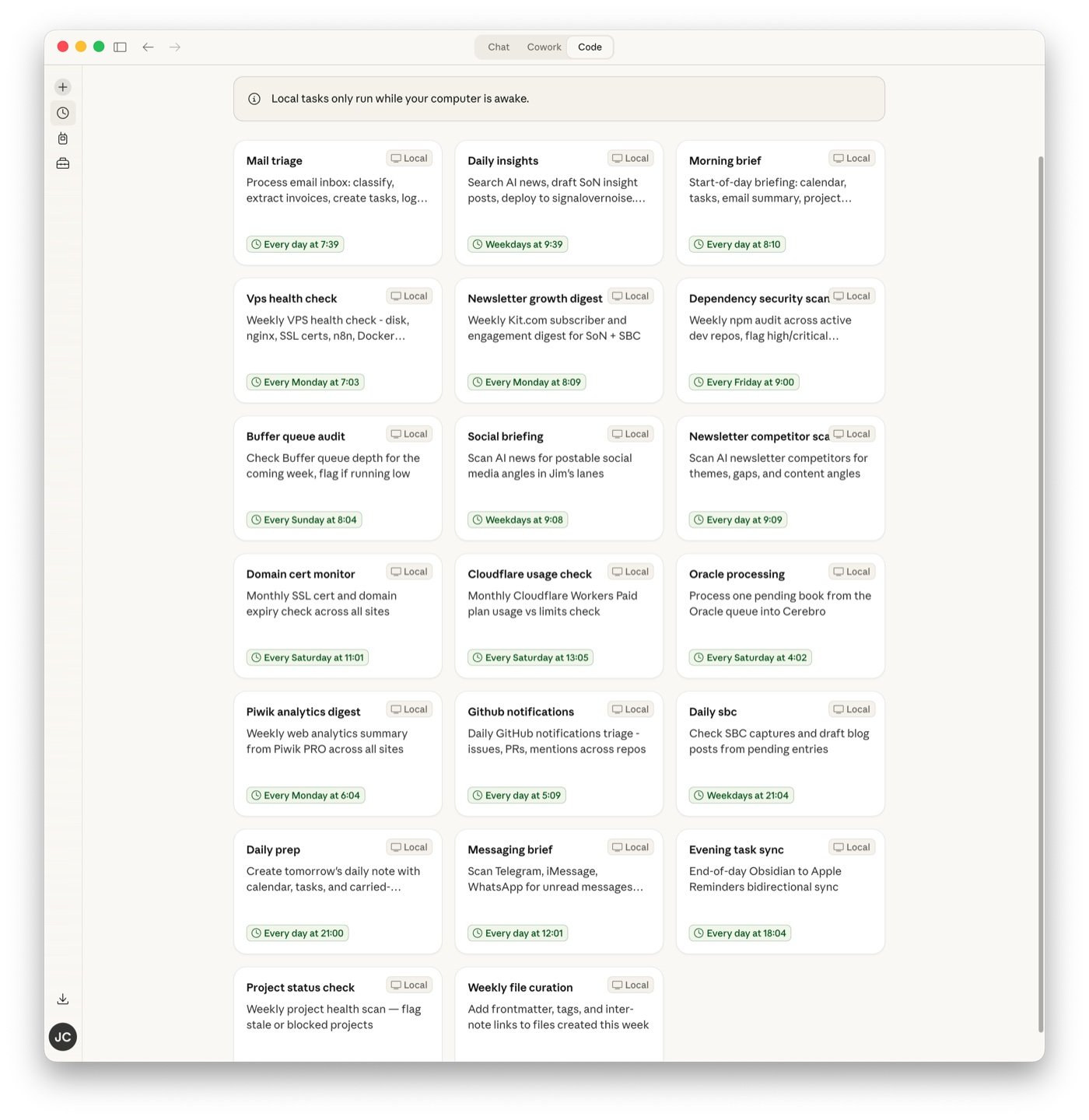
The core rhythm runs every morning before I sit down. Email triage at 7:30 processes five accounts — classifies messages, extracts invoices, creates follow-up tasks. A morning briefing at 8:00 pulls together my calendar, overdue tasks, and whatever the email triage found. GitHub notifications at 8:30 checks for open issues, PRs, and security alerts.
On weekdays, an AI news scanner at 9:30 searches for stories in my lanes and drafts blog posts. A messaging scan at noon checks Telegram, iMessage, and WhatsApp for anything needing a reply. A task sync at 6pm catches anything I added via my phone during the day. On weekday evenings, a newsletter capture processor drafts blog posts from notes I’ve flagged. At 9pm, it creates tomorrow’s daily note with calendar events pre-loaded.
Weekly (four tasks):
Monday morning: SSH into my VPS to check disk space, nginx status, SSL certificates, and Docker containers. Also pull newsletter subscriber data from my email platform.
Friday: run npm audit across all my development repos and flag anything high or critical. Friday afternoon: scan active projects for anything untouched in seven days.
Sunday evening: audit my social media queue for the coming week. If any channel has fewer than three posts scheduled, create a task for Monday.
Periodic (four tasks):
Twice a week, scan AI news for social media posting angles. Wednesday, scan competitor newsletters for themes and gaps. On the first of each month, check SSL certificate and domain registration expiry dates across all my sites, and pull Cloudflare usage metrics against my plan limits.
Weekly extras (four tasks):
A book processing task on Saturday mornings that extracts patterns from my reading queue, an analytics digest from my web stats platform, a project health check, and weekly file cleanup — adding metadata and links to files created during the week.
Here’s what the full grid looks like in Claude Desktop:
You wouldn’t hire a senior engineer to check disk space
This is the part I spent the most time thinking about.
Claude has three model tiers: Haiku (fast, cheap), Sonnet (balanced), and Opus (the full thing). Eight daily tasks firing means the model choice has a real cost impact.
Most of these tasks are mechanical — checking GitHub notifications is parsing CLI output, running npm audit is reading JSON, syncing tasks between two apps is running a shell script and logging what happened. None of that needs Opus. It barely needs Sonnet.
But email triage — reading messages, deciding what’s spam vs what needs a reply vs what’s an invoice — requires judgment. And writing blog posts from news stories requires actual writing quality.
I split it: eight tasks on Haiku (CLI parsing, API checks, simple data collection), eight on Sonnet (email classification, research, moderate reasoning), four on Opus (blog post drafting, book processing, newsletter writing).
The cheap model does the grunt work. The expensive model only fires when the output needs to be good, not just correct. I haven’t run this long enough to know the actual cost difference, but the principle is sound — you wouldn’t hire a senior engineer to check disk space.
Draft-only for anything that publishes
Every task that could put words in front of other people runs in draft-only mode. The news scanner writes blog posts but doesn’t deploy them. The newsletter processor drafts but doesn’t send. The social briefing suggests angles but doesn’t post.
Each one adds a line to my daily note: “drafts ready for review.” The human gate stays closed until I open it.
This wasn’t a difficult decision. I’ve been burned enough times by automated content going live with problems — wrong tone, unverified claims, a timestamp that puts a blog post in the future so the CMS hides it entirely. The value I’m aiming for isn’t “AI publishes things.” It’s “AI has things ready for me to decide on.” The bottleneck in my content workflow was never the writing. It was the blank page.
The order is the architecture
The tasks aren’t independent. They’re a pipeline, and the order matters.
Email triage runs at 7:30. The morning briefing runs at 8:00 and checks whether email triage already finished. If it did, the briefing summarizes those results instead of re-scanning. If it didn’t — maybe the computer was asleep — the briefing does a basic scan itself.
On Mondays, newsletter subscriber data pulls at 8:00. The morning briefing, running at the same time, can reference that data.
Sunday evening’s social queue audit creates a task for Monday if the queue is thin. Monday morning’s briefing surfaces that task. The information flows forward without me having to remember where it came from.
I designed the pipeline on paper before creating any of the task files. The weekly rhythm looks like a train schedule — things arrive in order, each one either producing data a later task consumes or creating a task a later briefing surfaces.
Twenty config files and a hypothesis
I set this up today. I haven’t lived with it.
I don’t know if the email triage will be good enough to trust without spot-checking every message, or if the morning briefing will be genuinely useful or just noisy. I don’t know if the news scanner will find stories worth writing about or produce garbage I delete every morning. And I have no idea if the VPS health check will catch real problems or just tell me everything is fine every single Monday for the rest of time.
I also don’t know the cost. Twenty tasks — some daily, some weekly — on a mix of three model tiers. My hypothesis is that Haiku handles the mechanical tasks fine and the overall cost stays reasonable, but I’ll need a few weeks of data to confirm.
What I do know: the design decisions feel right. Tiered models for different complexity, draft-only for anything that publishes, pipeline sequencing so tasks build on each other, and graceful failure — if one platform is down, log the error and move on, don’t let it block everything else.
I’ll report back after it’s been running for a while. Right now, it’s a Saturday afternoon experiment with twenty config files and a reasonable hypothesis that my Monday mornings are about to get a lot shorter.