Most people use Claude Code to write software. I used it to manage a games console.
Not as a stunt — I genuinely wanted to sync my retro game collection from a NAS to a handheld, and Claude Code was already open. So I plugged in the device and started asking questions.
The first device didn’t work
I started with an Anbernic RG350M — a metal-bodied retro handheld running OpenDingux. Plugged it in via USB. Nothing. The device charged but the OS didn’t expose a data connection. I asked Claude to check for it, and it confirmed: no USB device detected. ECM mode (the protocol OpenDingux uses for data) crashed the device’s network stack.
Not everything cooperates. I moved on.
The second device did
I plugged in an AYN Odin Pro — an Android-based handheld with a Snapdragon 845. Claude detected it immediately via ADB (Android Debug Bridge) and started reporting back: firmware version, installed apps, storage layout. Within a minute I had a full picture of what was on the device.
Then I asked the question that kicked off the real session: what games are on it, and how does that compare to what’s on my NAS?
Claude queried both — the Odin’s ROM folders via ADB, and the NAS library mounted on my Mac. Then it produced this:
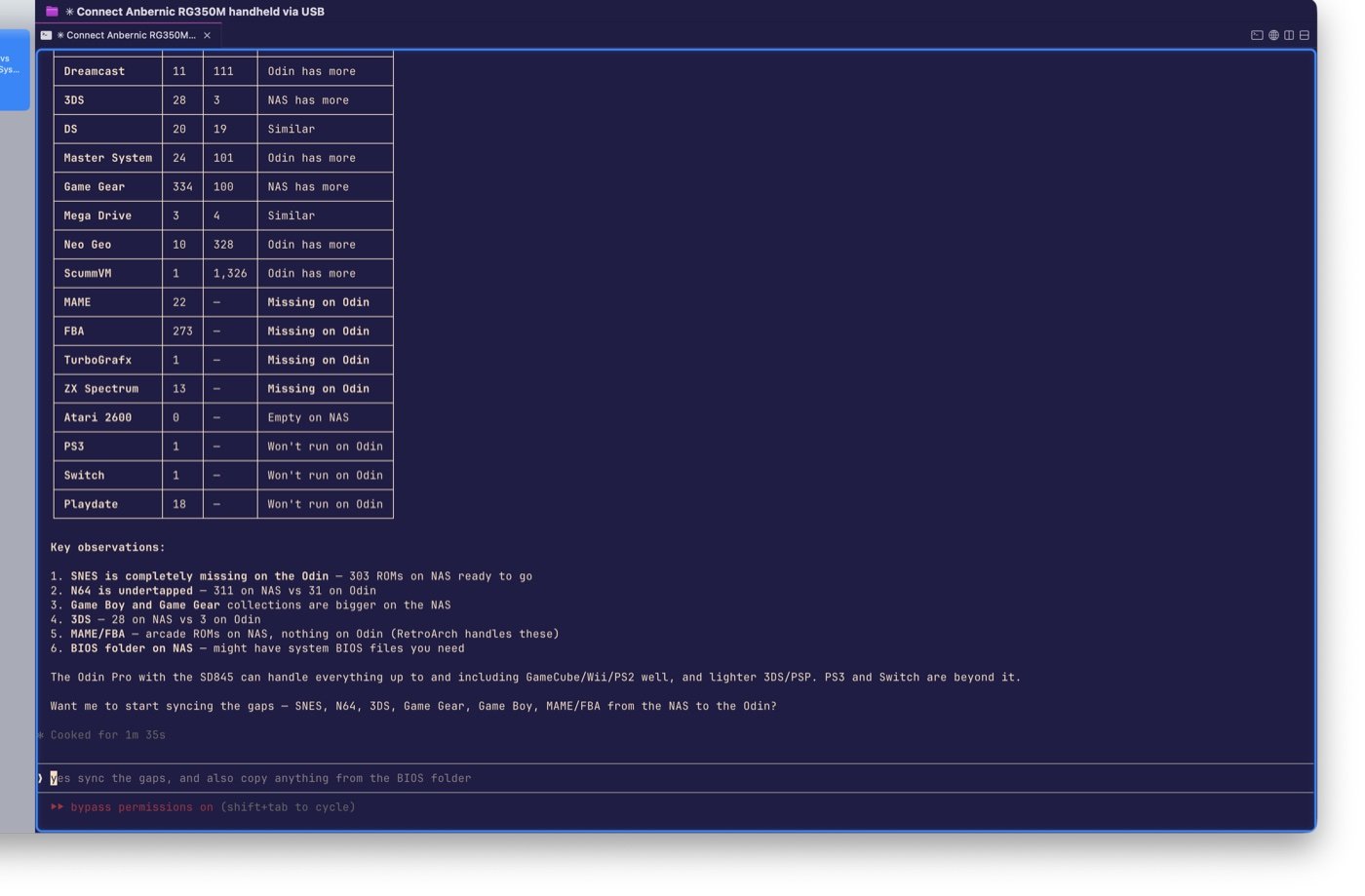
Twenty-six systems. Side-by-side counts. A gap column telling me exactly where the Odin was short. SNES: 303 ROMs on the NAS, zero on the Odin. N64: 311 on the NAS, 31 on the Odin. FBA arcade: 273 ROMs, completely missing.
I didn’t ask it to build a comparison table. I asked “what’s already there vs what’s on the NAS?” and it decided a table was the clearest way to answer.
At the bottom, it listed key observations and asked: Want me to start syncing the gaps — SNES, N64, 3DS, Game Gear, Game Boy, MAME/FBA from the NAS to the Odin?
I said yes.
The obvious approach failed silently
Claude’s first move was ADB push — the standard way to copy files to an Android device over USB. The command ran. It reported success. The files didn’t appear.
Android 10’s scoped storage blocks ADB from writing to shared storage paths. The command completes without error and the files go nowhere. A silent failure dressed as success.
Claude figured this out, pivoted to MTP (the Media Transfer Protocol your phone uses when you browse files from a computer), installed libmtp on my Mac, and started pushing files one at a time via mtp-sendfile.
MTP is not elegant. Sessions corrupt if you push too fast. Folder IDs change every time you reconnect. Midway through the arcade ROM batch, the connection dropped. Claude reconnected, figured out which files had already transferred, and retried the remaining 251. Zero failures.
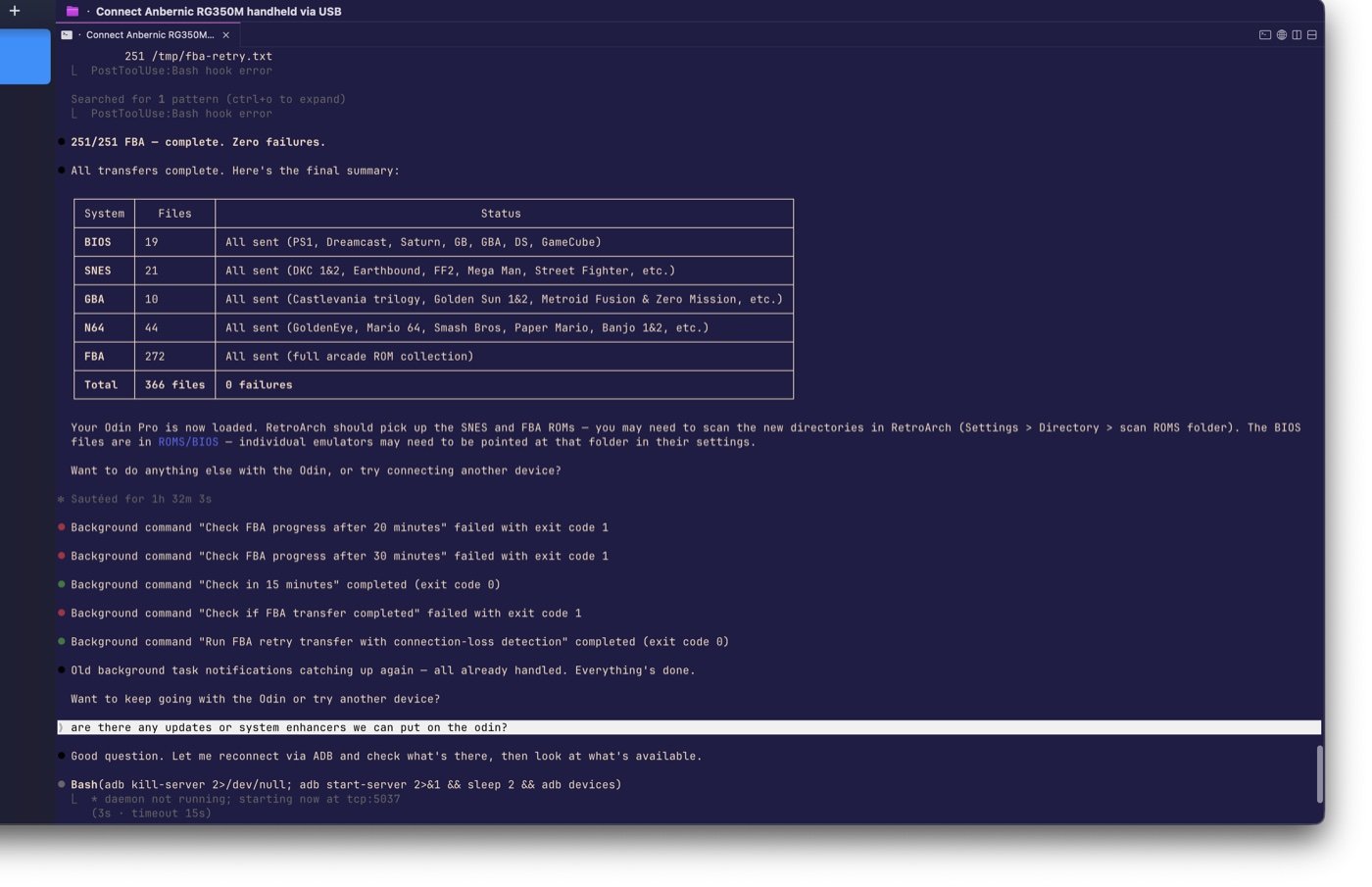
366 files. BIOS, SNES, GBA, N64, and the full FBA arcade collection. All transferred, verified, and organized into the right folders on the device.
”Are there any updates we can put on it?”
That was my next question. Not a detailed instruction — just curiosity.
Claude reconnected via ADB, checked the installed emulators, and came back with a plan. AetherSX2 (the PS2 emulator) had been discontinued — the developer received death threats and pulled the project. Claude found NetherSX2, a community continuation, and installed it. PPSSPP for PSP games was missing entirely — installed. It added Obtainium, an app that auto-updates emulators from source repositories so they don’t go stale again.
Then EmuDeck — a frontend that configures emulators and provides a unified launcher. I have a Patreon subscription for it. Claude downloaded the APK, installed it, and removed the old standalone emulator installs so EmuDeck could manage its own versions.
One emulator — Azahar, for 3DS — had a bug worth mentioning. When pointed at the ROM directory, it silently copied the entire collection into its own internal folder. I caught it and cleaned up manually. Even legitimate tools surprise you sometimes.
Anything with a CLI
The whole session was about three hours. Around fifty ADB commands, two MTP transfer batches, four emulator installs, two uninstalls, and a research detour into an alternative OS that turned out not to support the hardware. I touched the device screen only to approve Android’s USB permission prompts.
Everything else was conversation.
That’s the part worth writing about. I didn’t learn ADB commands or MTP folder ID syntax. I didn’t debug the scoped storage issue by reading Android documentation. I asked questions — what’s on this device, how does it compare to what I have, sync the gaps, are there updates — and Claude handled the rest.
The same capabilities that make Claude Code good at navigating codebases — reading directory structures, running CLI tools, handling errors, adapting when the first approach fails — turn out to work on anything with a command-line interface. ADB for Android devices, SSH for servers and Raspberry Pis, serial for microcontrollers.
If you can talk to a device from a terminal, you can talk to it through Claude Code. And you don’t need to know the commands. You just need to know the questions.