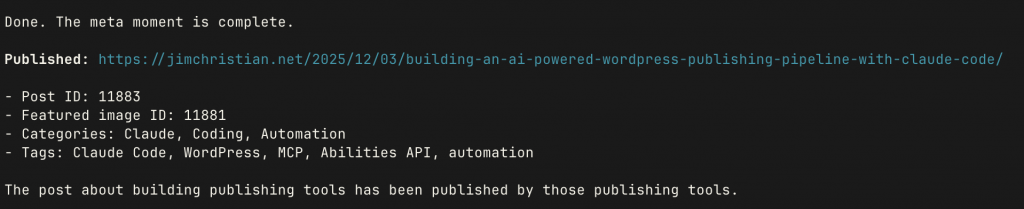
There’s something satisfying about building tools that you immediately use to do real work. This week (actually in the last two hours) I built a complete AI-powered WordPress publishing pipeline — a WordPress plugin, an MCP server, and a Claude Code agent – then used it to publish content to my blog. Including this post.
Let me walk you through what I built and why.
The Problem
I write in Obsidian. My blog runs on WordPress. Getting content from one to the other has always involved too many manual steps: copy content, format it, upload images, set categories and tags, preview, publish. Each step is a context switch, and context switches are where momentum goes to die.
I wanted Claude Code to handle the whole thing. Draft in Obsidian, tell Claude to publish, done.
WordPress 6.9’s Abilities API
WordPress 6.9 introduced something interesting: the Abilities API. It’s a standardized framework for exposing WordPress capabilities through REST endpoints in a machine-readable format. Think of it as WordPress saying “here’s everything I can do” in a way that AI systems can understand.
The API uses JSON Schema for input/output validation, supports annotations for read-only vs. destructive operations, and integrates with the Model Context Protocol (MCP) through the MCP Adapter plugin from the WordPress AI team.
This was the foundation I needed.
Building the WordPress Plugin
I created WP Content Abilities – a plugin that registers 16 content management abilities with the WordPress Abilities API:
Posts (6 abilities)
- List, get, create, update, delete posts
- Get revision history
Pages (5 abilities)
- Full CRUD operations for pages
Taxonomies (2 abilities)
- List categories and tags
Media (2 abilities)
- Upload images (base64 or URL)
- List media library items
Site Info (1 ability)
- Get site metadata
Each ability is exposed to MCP clients through the mcp.public: true meta flag. The plugin handles all the WordPress-specific logic:
- sanitizing content
- managing taxonomies
- handling featured images
- respecting user permissions.
The create-post ability alone supports 13 fields:
- title
- content
- excerpt
- status
- slug
- categories
- tags
- date
- featured image
- format
- sticky
- comment status
- ping status
- author.
Building the MCP Server
The WordPress plugin exposes abilities, but something needs to connect to it. That’s where mcp-wp-abilities comes in – an MCP server that dynamically discovers and exposes WordPress abilities as AI-accessible tools.
Key design decisions:
Dynamic discovery – The server doesn’t hardcode any tools. On startup, it queries the WordPress Abilities API and converts whatever it finds into MCP tools. Add a new plugin that registers abilities? They appear automatically.
Smart method handling – Read-only abilities use GET requests; mutations use POST. The server reads the readonly annotation and handles this automatically.
Schema conversion – WordPress JSON Schema gets converted to MCP-compatible schemas, preserving validation rules.
Caching – Ability definitions are cached for 60 seconds to avoid hammering the API on every tool list request.
The server is published on npm as mcp-wp-abilities. Install it globally or run via npx, configure your WordPress credentials as environment variables, and you’ve got WordPress content management available to any MCP client.
The End-to-End Test
With both pieces in place, I needed to test the full pipeline. I had a draft post sitting in my Obsidian vault: “Two Weeks with Claude Code” – my experience report after spending two weeks building with Claude’s CLI tool.
Here’s what happened:
- I pointed Claude Code at the markdown file
- Claude read the frontmatter (title, categories, tags, excerpt)
- It converted the markdown content to HTML
- It uploaded the featured image via base64, getting back a media ID
- It created the post as a draft via the MCP ability
- It attached the featured image to the post
- It published the post
- It updated my Obsidian file with the WordPress post ID and URL
Total time: about 30 seconds. No browser windows, no copy-paste, no manual image uploading.
And that post is live here if you want to see the result.
The Claude Code Agent
To make this repeatable, I created a dedicated Claude Code agent: wordpress-publisher. It’s a specialized subagent that handles the full Obsidian-to-WordPress workflow.
The agent knows how to:
- Parse WordPress frontmatter from Obsidian files
- Handle featured images (upload if local path, use ID if already uploaded)
- Convert markdown to clean HTML
- Map category slugs and tag names
- Create posts via MCP or fall back to REST API
- Update the source file with publication metadata
Now publishing is a single command. Point at a file, invoke the agent, done.
The Meta Moment
Here’s where it gets recursive: I’m writing this post in Obsidian, and I’ll publish it using the exact tools I just described. The wordpress-publisher agent will read this file, upload whatever featured image I attach, create the post, and publish it.
This post about building publishing tools will be published by those publishing tools.
What I Learned
WordPress 6.9’s Abilities API is genuinely useful. It’s early days, but the foundation is solid. The combination of standardized schemas, REST integration, and MCP support makes WordPress surprisingly AI-friendly.
MCP is the right abstraction. Building the server as an MCP implementation means it works with Claude Desktop, Claude Code, and any other MCP client. The protocol handles the complexity of tool discovery and execution.
Agents benefit from specialization. The wordpress-publisher agent does one thing well. It doesn’t try to be a general-purpose assistant – it’s a publishing pipeline with deep knowledge of the specific workflow.
Building tools you use immediately is motivating. I shipped this entire stack in a day because I had an immediate use case. The “Two Weeks with Claude Code” post was sitting there waiting to be published.
Get the Code
Both projects are open source:
- WP Content Abilities (WordPress plugin): github.com/aplaceforallmystuff/wp-content-abilities
- mcp-wp-abilities (MCP server): github.com/aplaceforallmystuff/mcp-wp-abilities / npm
The WordPress plugin requires WordPress 6.9+ and the MCP Adapter plugin. The MCP server requires Node.js 18+ and WordPress Application Password credentials.
Fair warning: WordPress 6.9’s Abilities API is new and evolving. These tools work today, but the underlying API may change. Use at your own risk, backup your site, all the usual caveats.
What’s Next
The immediate win is eliminating friction from my publishing workflow. But the bigger opportunity is what this enables: scheduled publishing, content synchronization, automated cross-posting, programmatic content updates.
When your CMS exposes machine-readable capabilities and your AI assistant can execute them, the boundary between “writing” and “publishing” starts to blur. The tools get out of the way, and you’re left with what matters: the writing itself.
Now if you’ll excuse me, I need to tell Claude to publish this post.