
Two weeks ago, I wrote about updating my Claude setup to support remote work. The goal was simple: access my Obsidian vault and Claude Code from anywhere, not just my MacBook.
That problem is solved. What I didn’t expect was how quickly the system would evolve from “remote terminal access” into something that functions more like an operating system for my work.
The Original Setup
Quick recap: Claude Code CLI running on a home server, Obsidian vault synced via Syncthing, Tailscale for secure access, Termius for mobile terminal work. It worked. I could SSH in from my iPad and run Claude against my vault.
But once you have a capable AI with persistent access to your work, you start asking different questions. Not “can I access this remotely?” but “what can I automate?” and “how do I make this repeatable?”
What Changed: The Agent Layer
The first evolution was realizing that Claude Code supports specialized agents — subprocesses that handle specific types of work. Instead of one Claude doing everything, I now have ten agents that each excel at particular tasks:
| Agent | Purpose |
|---|---|
| workflow-coordinator | Orchestrates multi-step work across domains |
| newsletter-researcher | Deep research using Perplexity for Signal Over Noise |
| newsletter-writer | Drafts content matching my voice profile |
| consulting-brief-generator | Creates assessment reports and proposals |
| inbox-processor | Sorts captured items into PARA locations |
| daily-notes-curator | Fixes formatting and links in daily notes |
| mcp-publisher | Handles npm publishing workflows |
| mcp-debugger | Systematic debugging for MCP server issues |
| pickaxe-auditor | Reviews Pickaxe chatbot configurations |
| pickaxe-builder | Builds Pickaxe tools section by section |
The workflow-coordinator is the interesting one. It doesn’t do specialized work itself — it analyzes requests, breaks them into tasks, dispatches to appropriate agents, and synthesizes results. Ask it to “prepare for a consulting call and draft a follow-up newsletter” and it will:
- Apply a mental model to prioritize the work
- Dispatch to consulting-brief-generator for client prep
- Dispatch to newsletter-researcher for topic research (in parallel)
- Wait for research, then dispatch to newsletter-writer
- Synthesize everything into a coherent handoff
I used this exact flow yesterday for the last Signal Over Noise issue.
The MCP Toolkit
Agents are useless without tools. MCP (Model Context Protocol) lets Claude interact with external services through standardized interfaces. My current toolkit:
Custom-built servers (published to npm):
- mcp-arr — Sonarr/Radarr/Lidarr/Readarr media management
- mcp-kit — Kit.com (formerly ConvertKit) subscriber and broadcast management
- mcp-pickaxe — Pickaxe chatbot knowledge bases, users, and analytics
- mcp-pihole — Pi-hole DNS blocking control and statistics
- mcp-tailscale — Tailscale network device management
Third-party and containerized servers:
- Perplexity — Web research with citation tracking
- n8n — Workflow automation (Claude can create, validate, and deploy n8n workflows)
- MoneyWiz — Personal finance data and analysis
- MCP Docker gateway — Runs multiple tools in containers: Playwright browser automation, Notion integration, YouTube transcript extraction, HackerNews
The n8n integration deserves a mention. Claude can search the n8n node library, validate workflow configurations against the schema, and deploy workflows directly to my self-hosted instance. When I need to connect services that don’t have MCP servers yet, I build the automation in n8n and Claude handles the configuration.
The Docker setup means I can spin up new MCP capabilities without polluting my local environment. Playwright runs headless in a container, Notion access is isolated, and adding new tools is a config change rather than an installation.
This means Claude can actually do things: check my Pi-hole stats, add a subscriber to my newsletter, query my media library, analyze my spending patterns, build an automation workflow, or control a headless browser.
The Meta-Layer: Skills, Commands, and Plugins
Here’s where it gets recursive. Claude Code supports:
Skills — Reusable prompts that expand when invoked. I have 17:
- Voice matching (voice-analyzer, voice-editor, voice-refresh)
- Content quality (slop-detector catches AI writing patterns)
- Workflow automation (log-to-daily-note, log-to-project)
- Decision support (think-first applies mental models before major decisions)
Slash commands — Quick invocations like /log-to-daily or /slop-detector [content]
Plugins — The taches-cc-resources plugin adds mental model commands:
/consider:first-principles— Break problems to fundamentals/consider:pareto— 80/20 analysis/consider:inversion— What would guarantee failure?- …and nine more
Hooks — Event-triggered actions. Currently just macOS notifications when tasks complete, but the infrastructure supports pre/post tool validation, automatic logging, and more.
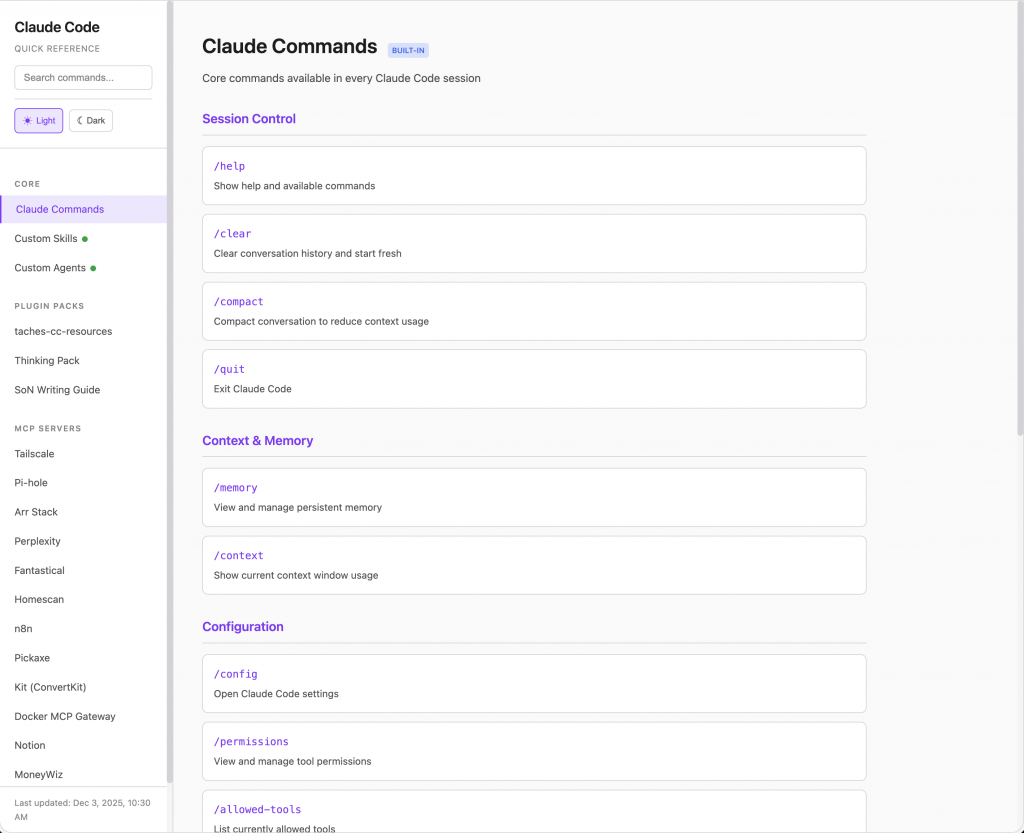
The Cheaters cheatsheet — With 10 agents, 17 skills, 11 slash commands, and 13 MCP servers, I needed a way to remember what I’d built. So I created a personal cheatsheet generator that scans my Claude Code configuration and produces a searchable reference card. One command updates it when I add new capabilities. As this system grows, having everything at my fingertips is essential.
The result is a system where I can say “write newsletter about [topic]” and Claude will:
- Invoke newsletter-researcher agent with Perplexity tools
- Pass research to newsletter-writer agent
- Run slop-detector to catch AI-isms
- Log the work to my daily note
- Notify me when done
All while I’m doing something else.
The CLAUDE.md as System Prompt
The 400-line CLAUDE.md file in my vault root tells Claude how I work. But that’s only half the picture — the vault itself contains 20 years of diary entries, journals, meeting notes, and creative and business writing imported from Ulysses, Drafts, and DayOne, plus a couple years of ChatGPT conversation history.
Getting that data out wasn’t trivial. Most of those apps have vendor lock-in by design — no export, or export to formats that lose structure. Claude Code helped me crack open the SQLite databases, reverse-engineer the schemas, and write scripts that preserved everything: timestamps, tags, attachments. Twenty years of thinking, rescued from proprietary silos into plain markdown I actually own.
Claude isn’t just following instructions. It’s reading two decades of how I think, what I’ve built, and how my opinions have evolved. The CLAUDE.md file contains:
- Business context (what I do, how I work)
- Vault structure (where things live)
- Decision protocols (when to apply mental models)
- Writing guidelines (what to avoid, how to match my voice)
- Security requirements (never expose API keys)
- Commit standards (conventional commits, changelog maintenance)
- Publishing profiles (GitHub username, npm conventions)
Every Claude session in this vault inherits this context. The file is both documentation and configuration.
What’s Different About This
Most AI productivity content focuses on prompting techniques or tool comparisons. This is different because:
It’s infrastructure, not interaction. I’m not crafting clever prompts for each task. I’m building systems that execute workflows consistently.
It compounds. Each new skill, agent, or MCP server makes the whole system more capable. The newsletter-researcher didn’t exist two weeks ago. Now it’s part of a production pipeline.
It’s local-first. Everything runs on my hardware against my data. No vendor lock-in, no API rate limits on my own workflows, no privacy concerns about vault contents.
It already has memory. I considered adding PostgreSQL as a memory layer for Claude. Then I realized — the Obsidian vault is the memory layer. The /log-to-daily and /log-to-project commands write session context back to the vault. Next time Claude works in that project, the history is right there in markdown. No vector database needed. The vault is both the knowledge base and the RAG.
It fails gracefully. When an MCP server isn’t responding, Claude notices and tells me. When a task seems to need clarification, it asks. The agents are autonomous but not unsupervised.
Why This Matters
I’m a knowledge worker, not a coder. But I’ve always tried to apply a developer’s mindset to my work — systems thinking, automation, reducing friction. The gap was always execution. I had ideas I couldn’t build.
Claude Opus 4.5 changed that. I’m resurrecting project ideas from 2012 that I’d abandoned because I couldn’t bridge the knowledge gaps. MCP servers, database extraction scripts, automation workflows — things that would have taken me months of learning (or hiring someone) now take an afternoon of collaboration.
I cancelled my ChatGPT Plus subscription last week. I’ve accomplished more in two weeks with Opus 4.5 than I did in two years with ChatGPT. That’s not hyperbole — it’s the difference between a tool that answers questions and a tool that builds systems alongside you.
What’s Next
The system keeps evolving. Current experiments:
- Vector storage layer — Adding ChromaDB or PostgreSQL with pgvector for semantic search across the vault
- Make.com integration for triggering external automations
- Fantastical calendar MCP for scheduling awareness
- Automated weekly reviews that process inbox, curate notes, and generate summaries
Claude handles the coordination. I handle the judgment calls. The ratio of thinking to typing has never been better.
This post was drafted with Claude Code, checked by the slop-detector skill, and edited to match my voice profile.
1 thought on “From Remote Access to Agentic OS: Two Weeks with Claude Code”